I am already a subscribed to your newsletter, but I keep getting a pop-up asking me to subscribe. This ‘nagging’ action is a fairly recent problem. This is beginning to annoy me and I would appreciate knowing how to stop this from occurring.
First, thanks for subscribing, I appreciate it.
Second, I’m sorry that my site is annoying you. It’s not supposed to.
The problem is cookies.
The fact that you’re subscribed actually has nothing to do with whether or not you see that popup. The website doesn’t know who you are, and is completely unrelated in technology to the newsletter. It certainly doesn’t “know” whether or not you’re subscribed.
There are two “popups” you may be seeing. The full page pop-up:
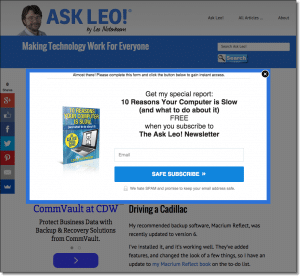
That popup is supposed to be shown exactly once, and then not again for 90 days. (The timing may change, but you get the idea, it’s supposed to be “for a while”.)
The other is more correctly termed a “slider”, and slides up from the bottom when you get close to the bottom of a page:
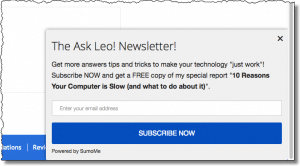
That should be shown only once a day.
Both limit themselves by instructing your web browser to put a cookie on your machine so that it knows “oh, you’ve seen this already, I don’t need to bug you”.
So why is it bugging you anyway?
There are several possibilities:
- You’re opening multiple tabs or windows at once before the cookies have been set. Each tab then thinks it’s the first for the day.
- You have cookies disabled. Without cookies, I have no way to keep track of the fact that you’ve seen the popup before.
- Your internet security software is blocking cookies. Same problem: without cookies, I don’t know not to bug you. If you can, add an exception for “askleo.com”, “ask-leo.com”, “leadpages.net”, “sumome.com” and “aweber.com”. AWeber is my newsletter email provider, LeadPages.net is a provider of some of the newsletter subscription tools I use, and Sumome provides the social media share buttons as well as the bottom slider.
- You’re regularly clearing your cookies – either manually or through some automated process. This causes my site to “forget” that you’d visited before.
- You’re using a different browser on each visit. OK, probably not each visit, but since each browser keeps it’s own list of cookies, the first time you visit the site in, say, Internet Explorer, you’ll still see the pop-up once even though you’ve visited before using FireFox.
- You’re using a different machine. Same issue as the previous point – cookies are kept separately on each machine.
If none of those work, you can also block Javascript on my site, and you’ll not see the popup. My recommended approach is to use the NoScript plugin to FireFox to enable and disable Javascript selectively on for sites that you do and don’t trust. Unfortunately there may be other features of the site that will then also stop working.
The newsletter subscription pop-ups are actually vital to Ask Leo!’s survival. I have run without it, and the results were not pretty. It, like some amount of advertising, are what helps pay the bills, and keep Ask Leo! free and vibrant.
Thanks for understanding,

Is there any way to protect cookies from selected sites from being cleaned along with a general clearing of cookies?
Why not use some other way to remember me that does not use cookies. I always erase all of them when I sign off.
04-Mar-2009
Why does your popup resemble ask Bob Rankin, exactly. That site also has a subscriber pop up. It also does not know I subscribed. My cookies are enabled, Netzero hates disabled cookies.
04-Mar-2009
Just a thought: Of course this is an annoying pop-up, but come on people – for all Leo does for all of us is it that much trouble to just click the little “X” to turn it off. Leo gives us a wealth of information each and every week and asks nothing in return. I hate pop-ups as much as anyone, but it is the only pop-up we get in his newsletters, (unlike many sites), and Leo does not bombard us with ads, etc. Leo must get many comments and questions about this pop-up for him to even address it, so wouldn’t we all be better off if the space he had to use (and time) to address this issue was used for a more important issue? We should all be grateful for all Leo does for us and just learn to live with it. Thanks again Leo!
Leo…that pop up mentioned above is so easily gotten rid of by clicking on that “x” that I evaded my guilty feeling that I’d somehow let my subscription lapse to your superb newsletter. I’d put up with a lot more than that to continue receiving this N/L.
I’d like to hear a suggestion for Bob Rocha’s question about the selection of cookies to retain. (Firefox, if set, obligingly eliminates all cookies at shutdown.)
You could give your visitors the option of logging in to your website with their email address. And then you could check that addy with the list of your subscribers. As long as they are logged in they shouldn’t see the popup.
15-Jul-2009
Hi Leo, I don’t know if this will work or not. I use Firefox, and delete when closing all the time. However I do read my email in a browser. Could the links within the newsletter ‘pre-set’ the cookie maybe? Then when the site is entered, the cookie will be there having been planted by the link.?? Or use some sort of re-direction page on your site that places the cookie?? I’m just thinking is there an alternate way to set the cookie in each time from the newsletter?
15-Jul-2009